Elevate POS
A full café POS built around how UAE operators actually work — take an order on one screen, close the sale correctly, track food cost from ingredients through recipes, and open the owner report once a day to stay current.
Category
Custom POS system
Setup
Counter tablet · multi-branch ready
Stack
Web app · AED · 5% VAT
Mode
Cost-aware · progressive inventory
Screens
Eight modules. One system.
Sales Hub through Settings — every screen is built for the till, the kitchen and the owner.
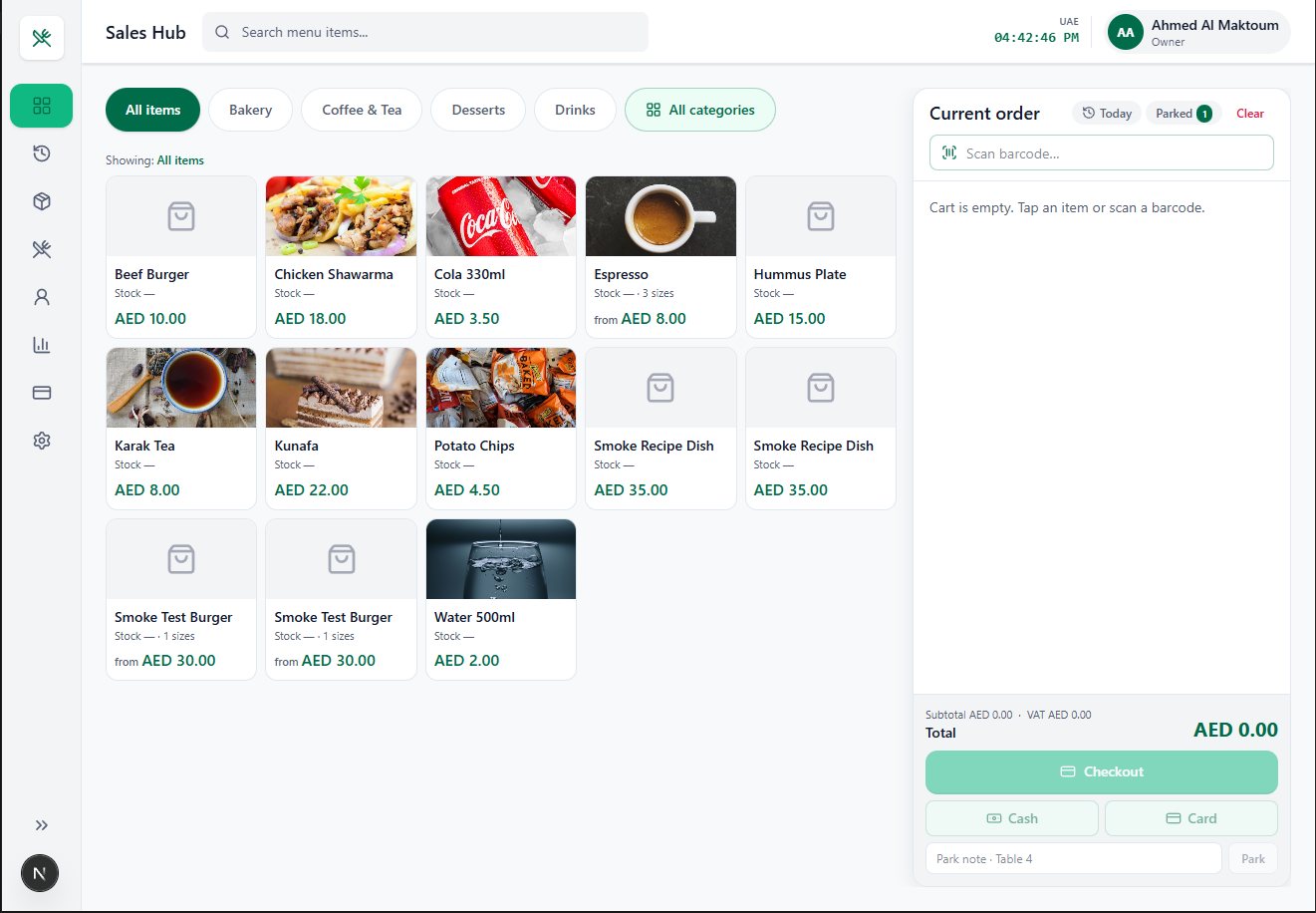
01 · Sales Hub
Sales Hub
Take an order in three taps, not three screens.
- Visual menu grid with photos — new staff are productive on day one; no memorizing item codes
- Category filters (Bakery, Coffee & Tea, Desserts, Drinks) — keeps a 200-item menu one tap away
- Live search across the menu — fastest path when the counter is busy
- Barcode scanning built into the cart — packaged goods ring up instantly
- Variant/size support (“3 sizes”, “from AED 8.00”) — one tile handles small/medium/large
- Park orders with a table note — take the next customer while table 4 is still deciding
- Today / Parked quick views right in the cart header
- Running subtotal, VAT and total always visible — no surprises at the till
- Cash / Card shortcuts to skip the checkout screen on simple sales
- Stock indicator on every tile — cashiers stop selling what the kitchen ran out of
The whole order flow lives on one screen. No mode switching, no keyboard.
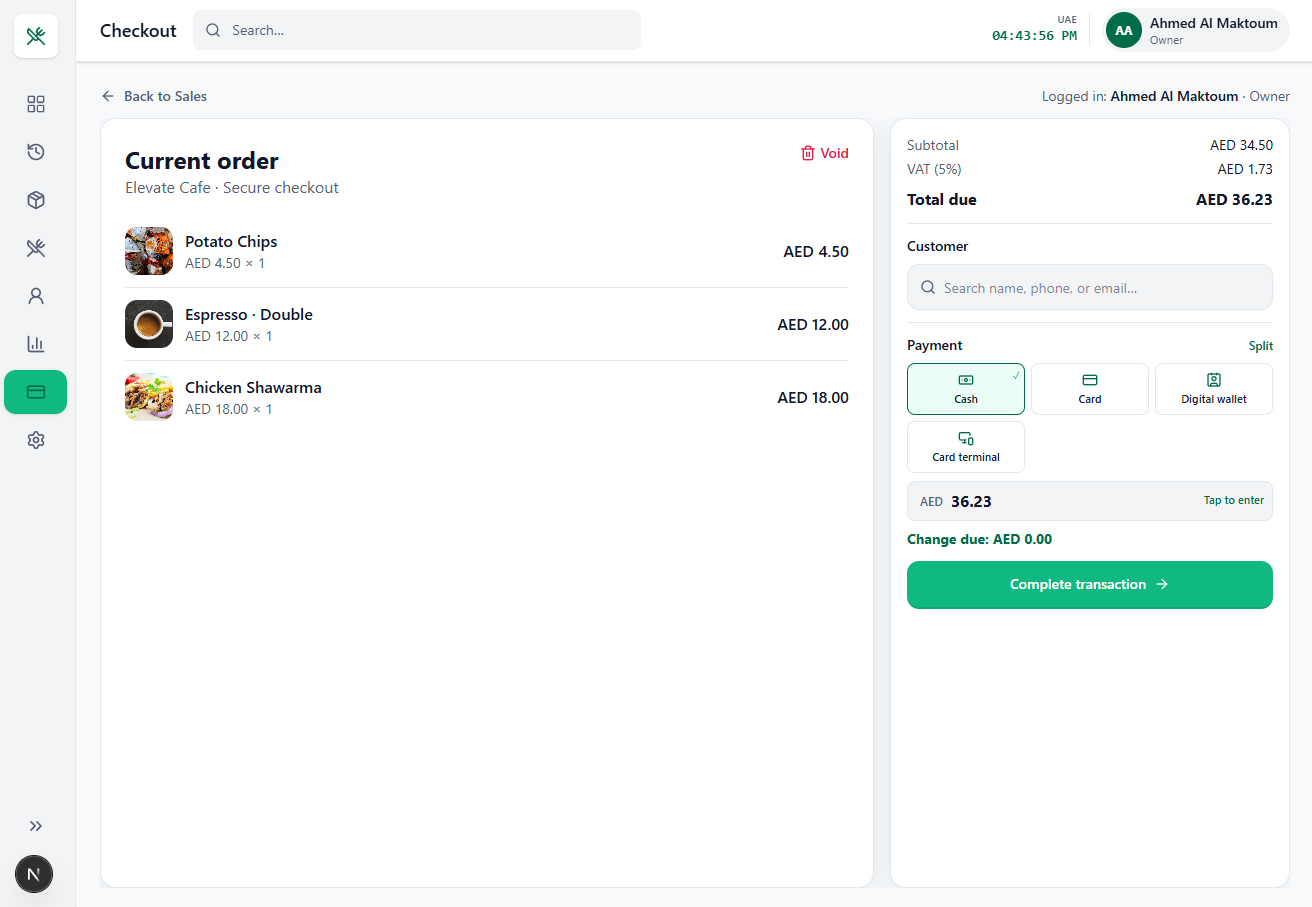
02 · Checkout
Checkout
Close the sale correctly, every time.
- Four payment methods — Cash, Card, Digital wallet, Card terminal
- Split payment — handles group bills without manual math
- Automatic VAT (5%) calculation — UAE-compliant totals with zero cashier input
- Change-due calculator — tap the tendered amount, the system does the rest
- Customer attach at checkout — search by name, phone or email
- Void control on the open order — mistakes get corrected before they hit your books
- Cashier identity on every transaction — you always know who rang what
- Line-item review with photos before committing
VAT, change, and split bills are the three places cashiers lose money. This screen removes all three.
03 · Sales History
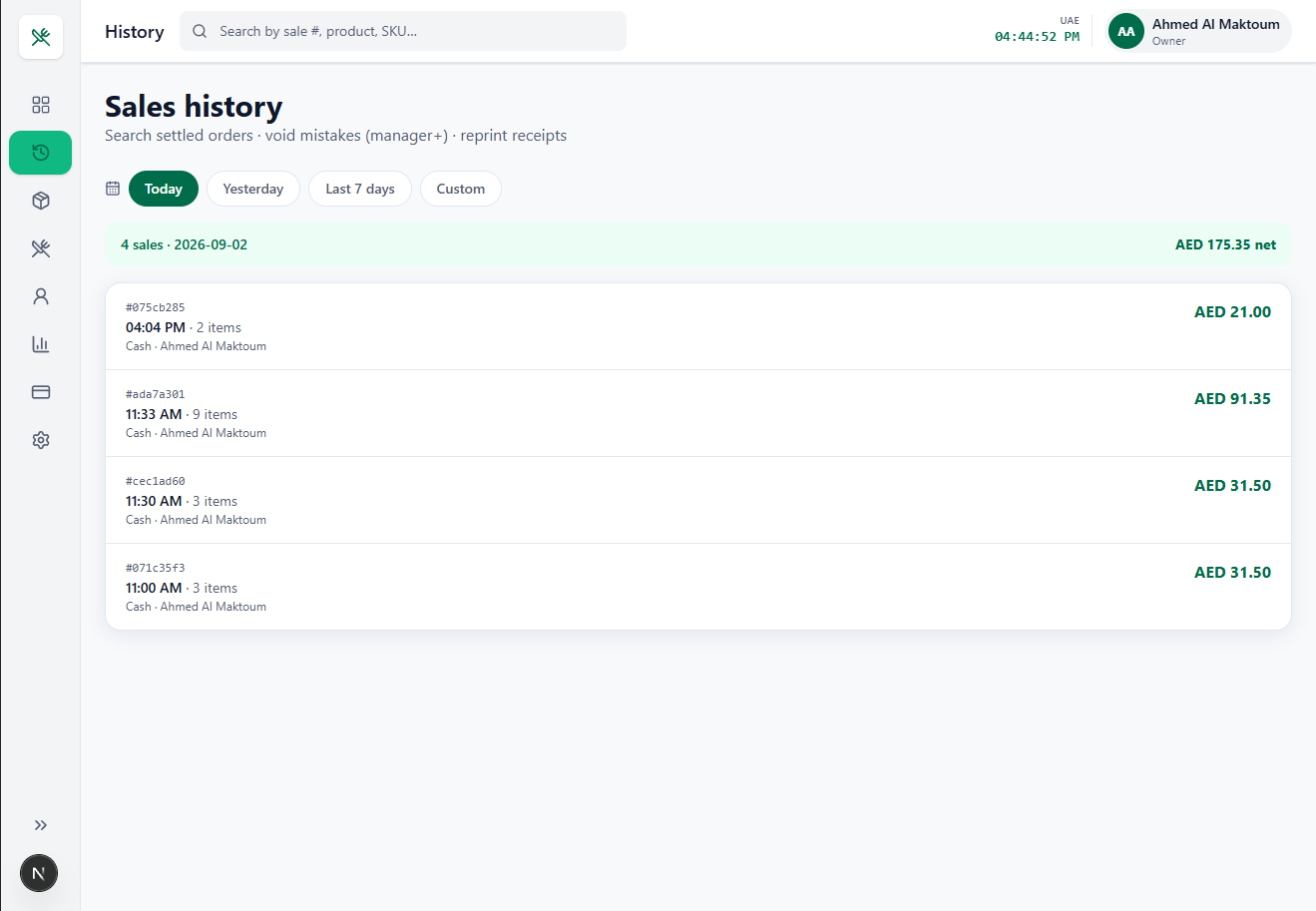
Sales History
Every receipt, findable in seconds.
- Search by sale #, product or SKU — settles customer disputes on the spot
- Date presets plus custom range (Today / Yesterday / Last 7 days)
- Daily rollup banner — sales count and net revenue for the period at a glance
- Full receipt detail per sale — time, item count, payment method, cashier
- Receipt reprinting — no more “I lost my receipt”
- Manager-gated voids — corrections require authority
This is your audit trail. When a customer complains or a shift doesn’t balance, you have the answer in one search.
04 · Menu / Inventory
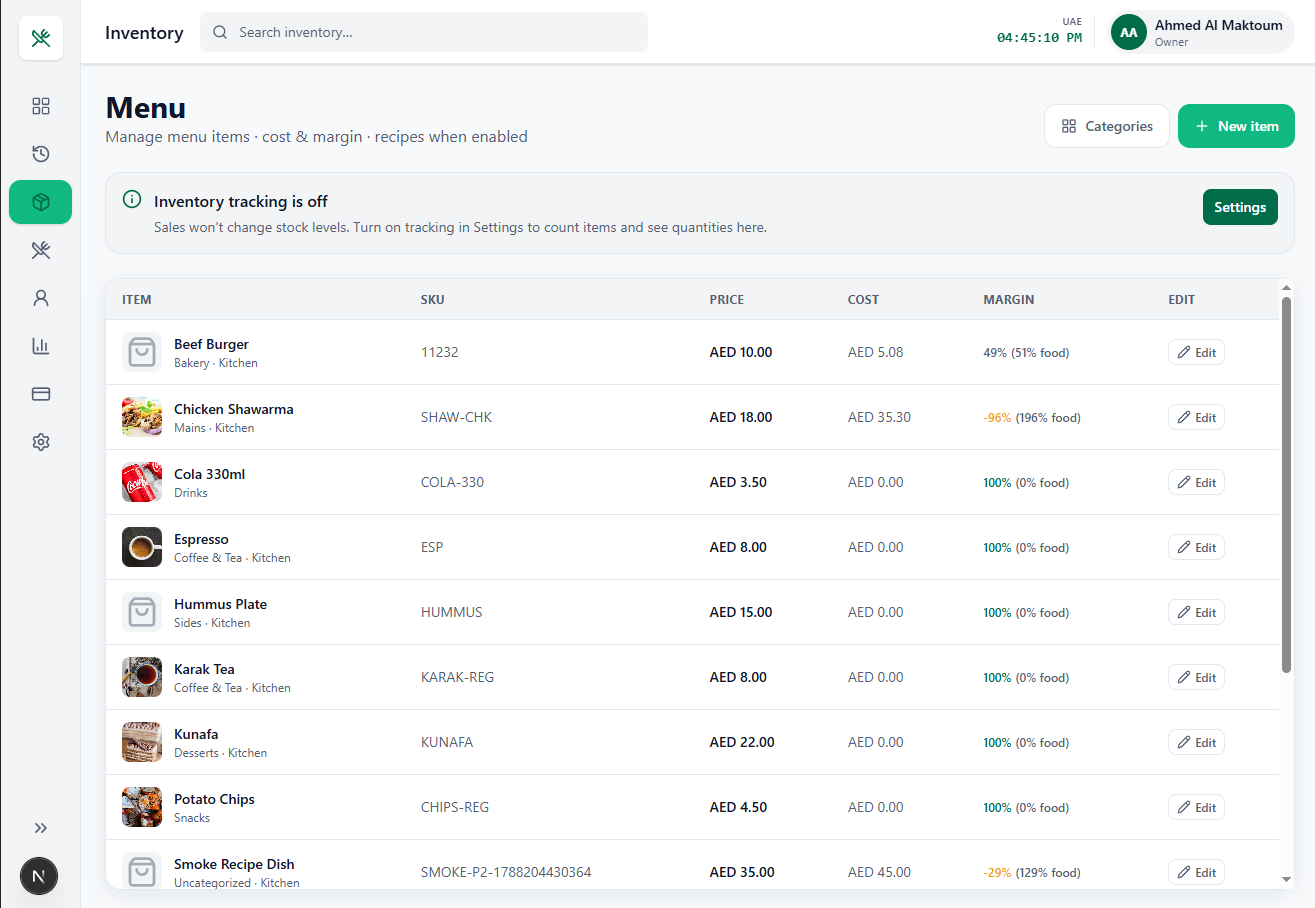
Menu / Inventory
See the profit on every item, not just the price.
- Cost and margin per item, calculated live — spot dishes that are bleeding money
- Food cost % beside every margin — the metric F&B operators actually manage against
- Negative-margin warnings in red — the system tells you when a price is wrong
- SKU management for barcode and reporting consistency
- Category + prep-station tagging (Bakery · Kitchen, Drinks) — feeds routing and reporting
- Recipe linking when enabled — item cost from real ingredient prices, not a guess
- Optional inventory tracking — turn it on when you’re ready
- Inline editing and one-click new items
Most POS systems tell you what you sold. This one tells you what you earned on it.
05 · Ingredients
Ingredients
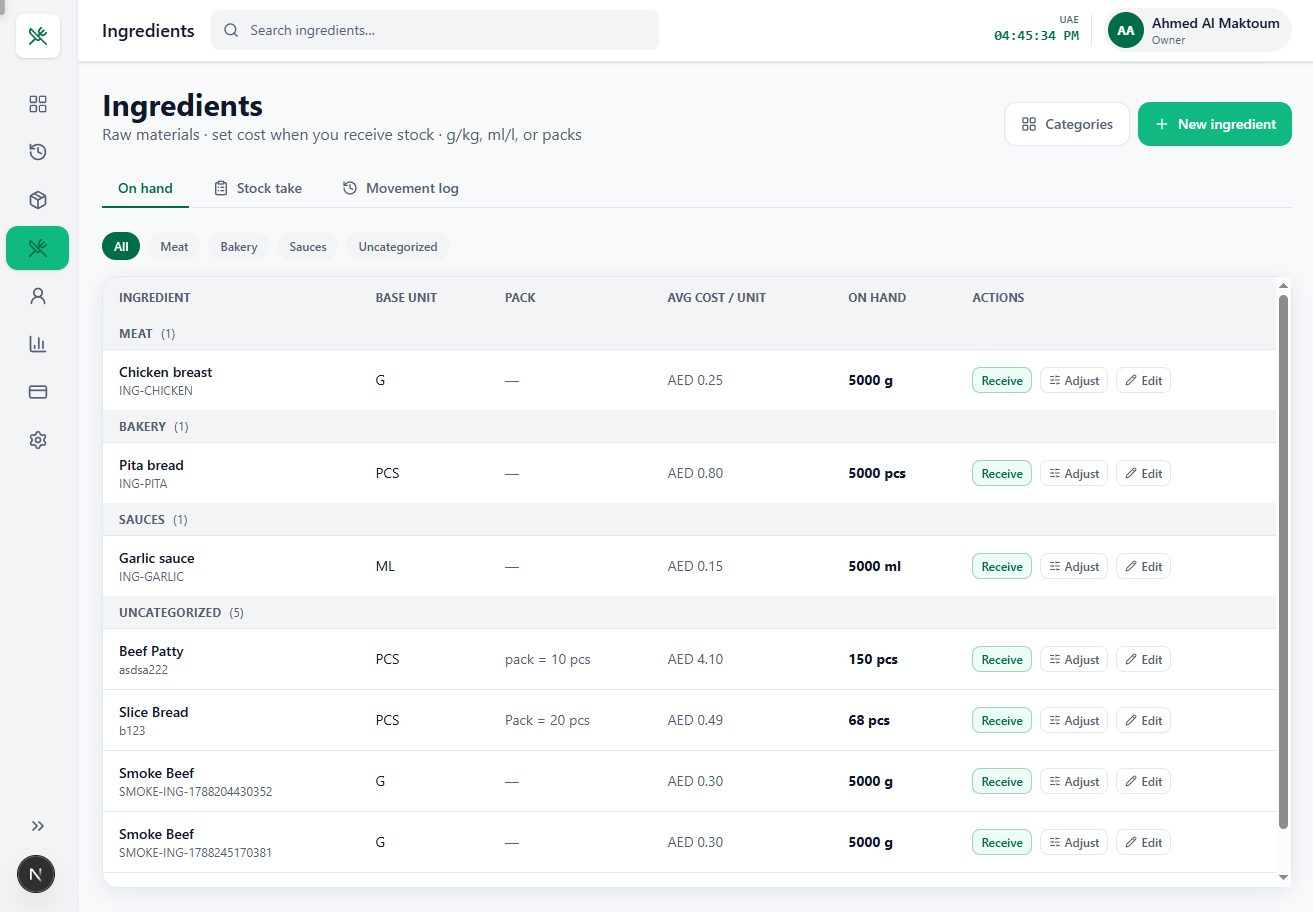
Recipe-level stock control, which is where the money actually leaks.
- Raw-material tracking separate from menu items — real back-of-house inventory
- Flexible base units — grams, kilos, ml, litres, pieces
- Pack conversions (“pack = 10 pcs”) — receive by case, consume by unit
- Weighted average cost per unit — updated as you receive stock
- Receive / Adjust workflow — separates deliveries from wastage and corrections
- Stock take mode — structured physical counts instead of a clipboard
- Movement log — full history of every in and out
- Ingredient categories (Meat, Bakery, Sauces) with counts
- On-hand quantities visible across the whole store
This is the module cheap POS systems don’t have. It’s the difference between knowing your food cost and guessing it.
06 · Customers
Customers
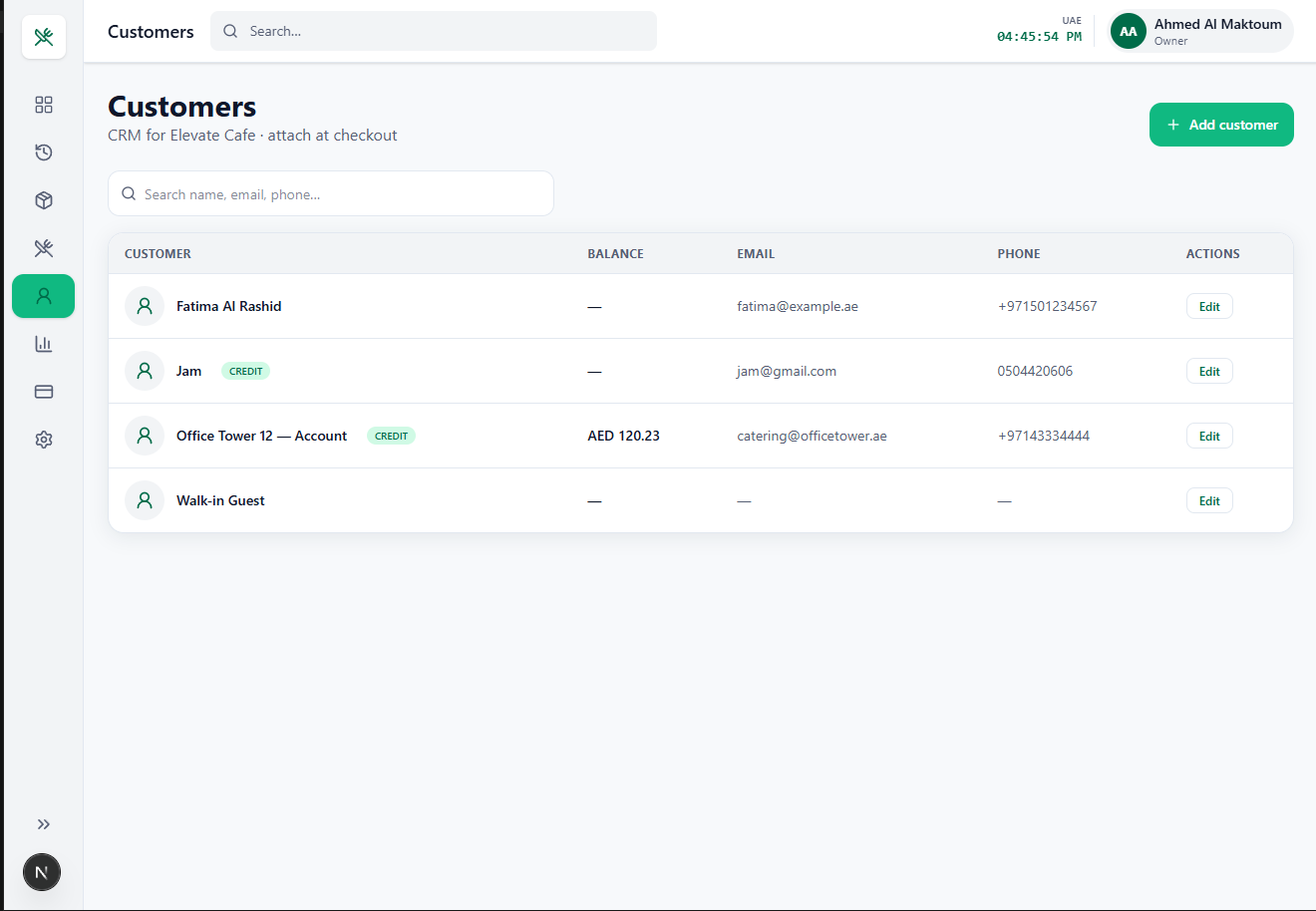
Turn walk-ins into accounts.
- Built-in CRM — no separate subscription, no integration project
- Attach customers at checkout for spend history per person
- Credit accounts with live balance tracking — invoice corporate clients
- CREDIT badge so cashiers know instantly who can charge to account
- Contact capture (email + phone) — your marketing list builds itself
- Search by name, email or phone
- Walk-in Guest default — the flow never stalls
Corporate catering and office accounts are the highest-margin revenue a café can get. This is the system that lets you take them.
07 · Reports
Reports
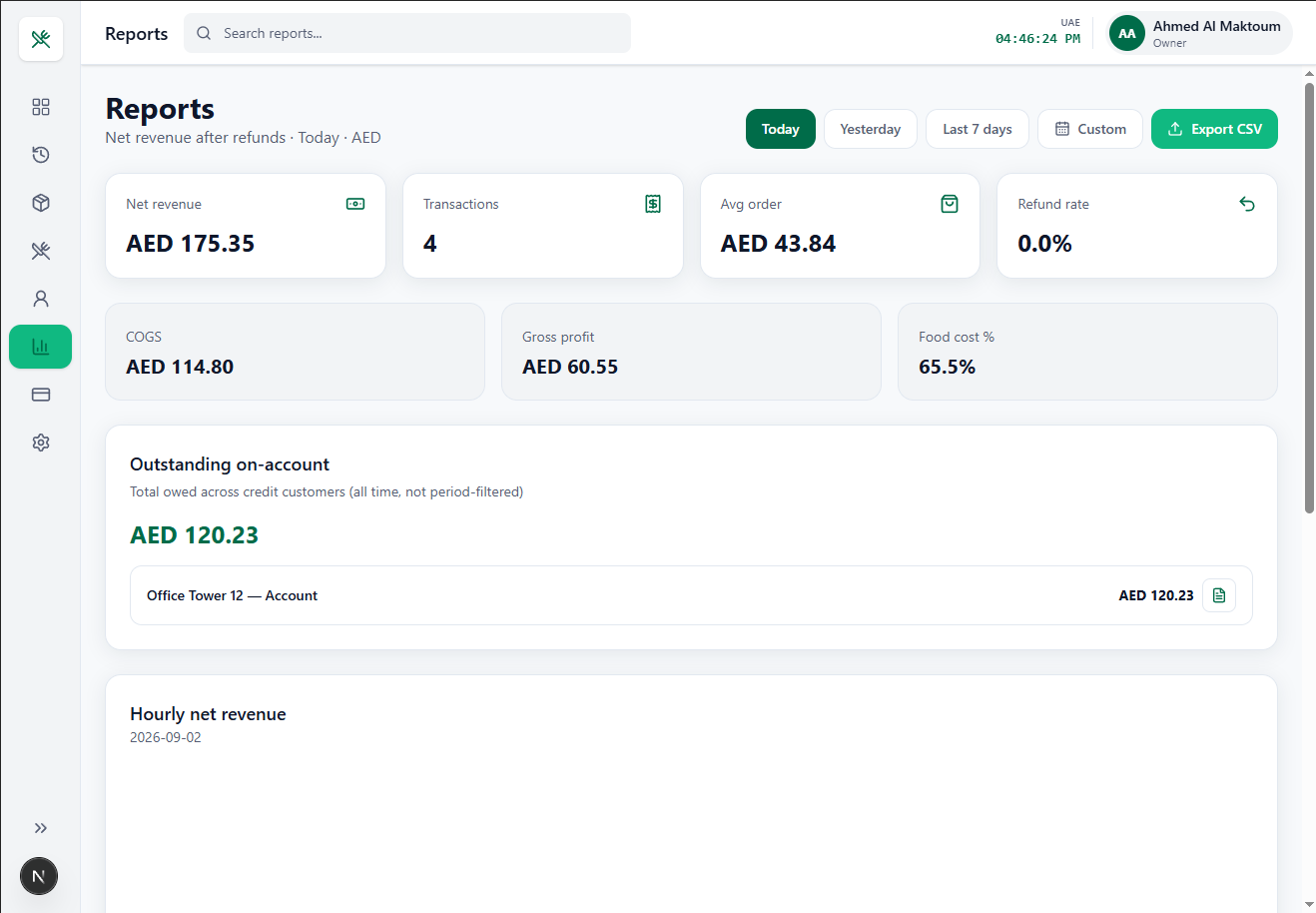
The owner’s screen — open it once a day and you’re current.
- Net revenue after refunds — the real number, not gross
- COGS and gross profit calculated automatically from ingredient and recipe costs
- Food cost % — the single KPI that decides whether a café survives
- Transaction count and average order value
- Refund rate — early warning on quality or staff problems
- Outstanding on-account totals with per-customer breakdown and statement export
- Hourly net revenue chart — schedule staff against actual demand
- Date presets plus custom ranges
- CSV export — hands straight to your accountant for VAT filing
P&L-grade numbers without an accountant, generated from data your cashiers already entered.
08 · Settings
Settings
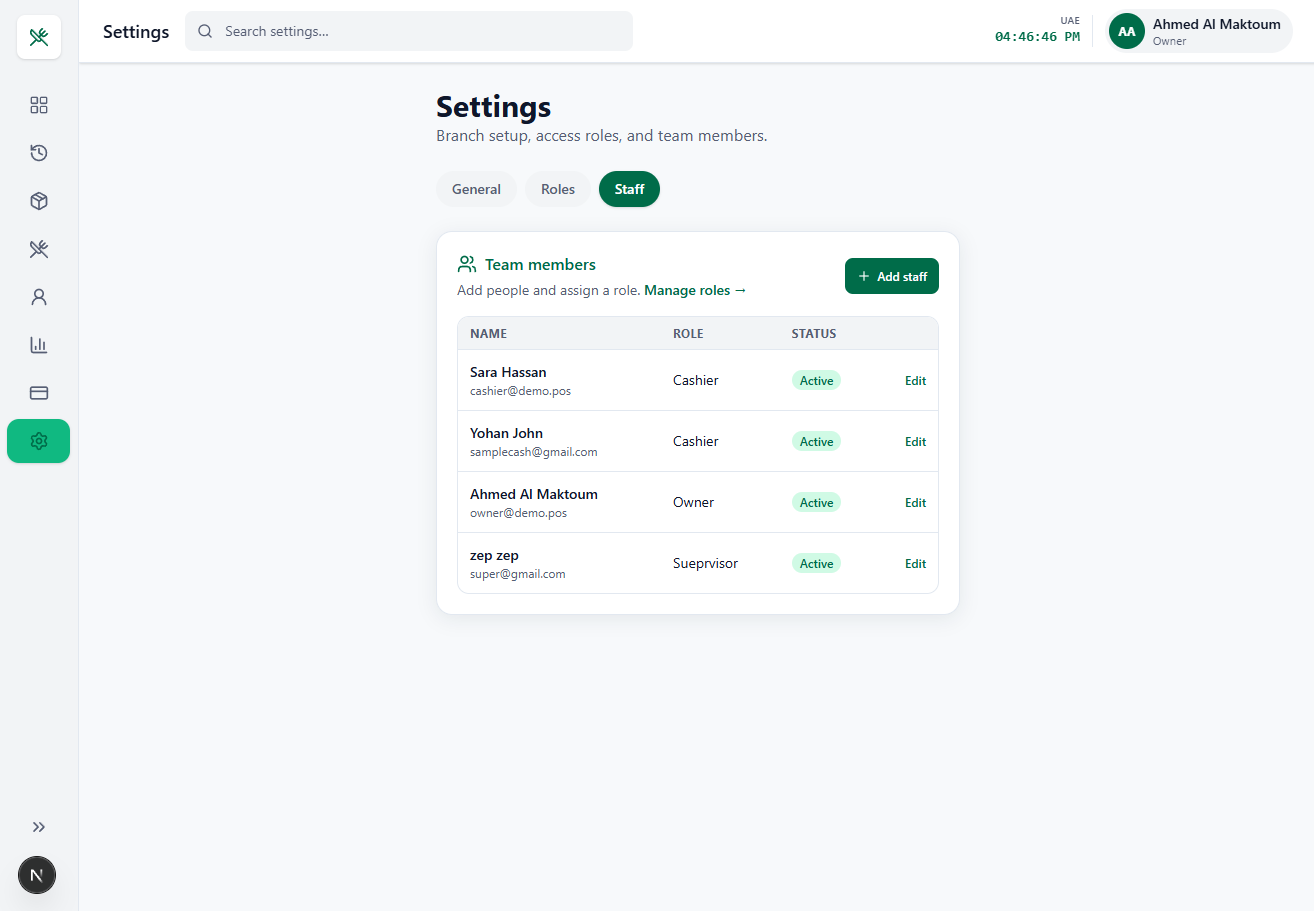
Control who can do what.
- Role-based access control (Owner, Supervisor, Cashier)
- Staff management with individual logins and email identity
- Active/inactive status — offboard instantly without deleting sales history
- Custom role editing — shape permissions to how your branch runs
- Branch setup for multi-location growth
- Per-user accountability — every sale, void and refund carries a name
Theft and “mistakes” happen where there’s no accountability. Roles plus the audit trail in Sales History close that gap.
Capabilities
Why operators choose it
Cross-cutting advantages that cheap POS systems leave out.
Built for the UAE
AED currency, 5% VAT, UAE time zone, +971 formats, and Arabic-market menu items out of the box.
Cost-aware architecture
Ingredients → recipes → item cost → food cost % → reports — all from one source of truth.
Progressive complexity
Inventory tracking is optional. A small café starts simple and switches it on as they grow.
Clean single-hand layout
Collapsible sidebar, consistent header — built to work on a counter tablet.
Real permissions from day one
Roles and accountability are built in — not an enterprise upsell.
Need an app built around your workflow?
Websites, apps and CRM — improve what you have or build what you need.